[Java Deserialization] A discussion of the Serialize and Deserialize mechanism in Java
Security vulnerabilities related to Java Deserialization (Deser) are hard for me. I spent a lot of time learning about it. And I didn’t stop. I want to learn new things and dig deeper into it. In this first post I’ll explain the Serialize and Deserialize mechanism in Java. It’s really just like notes I’m writing down for what I’ve learned.
I truly admire some of the seniors before me who have done deep research on this vulnerability and have many complex CVEs related to it: Jangg, Quynh Le.
What is Serialization?
Java provides an object serialization mechanism: an object can be represented as a byte sequence that includes the object’s data, information about the object’s type, and the data types stored in the object. After the serialized object is written to a file, it can be read from the file and decoded, meaning the object’s type information, the object’s data, and the data types in the object can be used to reconstruct that object. This whole process is independent of the JVM, meaning an object serialized on one platform can be deserialized on a completely different platform.
Serialization: The process of converting an object into a sequence of bytes.
Deserialization: The process of restoring a byte sequence back into an object.
What is Serialize created for?
- It can solve the problem of differences between platforms. For example, after serializing an object created on Windows and transferring it to Linux over the network, the object can be decoded directly to get the object without worrying about how data is represented on different machines and systems.
- RMI is necessary for remote method calls. RMI makes objects that exist on other hosts usable just like objects on the current host; when sending information to remote objects, the parameters and return values need to be passed through object serialization.
- Mandatory for Java Beans. When using a Bean, its state information is usually configured during the design phase; this state information needs to be saved and later restored when the program starts up, which is done by the deserialization mechanism.
- Convenient for saving object information so it can be used directly the next time the JVM starts up.
Conditions for serialization?
For a class object to be serialized, two conditions must be met:
- That class must implement java.io.Serializable.
- All of the class’s properties must be serializable. If a property can’t be serialized, then that property must be marked as transient
How to serialize?
To Serialize an object, first create an OutputStream object, wrap it in an ObjectOutputStream object, then just call writeObject() to serialize the object and send it to the OutputStream (Objects are byte based, so use InputStream and OutputStream to inherit the hierarchy).
To deserialize an object, you need to wrap the InputStream in an ObjectInputStream, then call readObject()
ObjectInputStream / ObjectOutputStream
The ObjectInputStream and ObjectOutputStream classes are high-level data streams that contain the methods to deserialize and serialize objects.
The ObjectOutputStream class contains many methods for writing different data types, used to serialize an object and send it to the output stream:
public final void writeObject(Object x) throws IOException
Similarly, the ObjectInputStream class contains a readObject() method to deserialize an object, used to get the object from the input stream and deserialize it; its return value is Object, so it needs to be cast to the appropriate data type:
public final Object readObject() throws IOException, ClassNotFoundException
Demo
Class User implements Serializable, where the address field is given the transient keyword:
import java.io.Serializable;
public class User implements Serializable {
    public String name;
    public transient String address;
    public int number;
    public void info(){
        System.out.println("Name: " + name + "\nAddress: " + address + "\nNumber: " + number);
    }
}
Another class that performs the serialization:
import java.io.FileOutputStream;
import java.io.IOException;
import java.io.ObjectOutputStream;

public class test {
    public static void serialize_test(){
        User user = new User();
        user.name = "tranquac";
        user.address = "VietNam";
        user.number = 2711;
        user.info();
        try {
            FileOutputStream fos = new FileOutputStream("user.ser");
            ObjectOutputStream obs = new ObjectOutputStream(fos);
            obs.writeObject(user);
            obs.close();
            fos.close();
            System.out.println("[*]User serialized to user.ser");
        } catch (IOException e){
            e.printStackTrace();
        }
    }

    public static void main(String[] args) {
        serialize_test();
    }
}
After running, checking the result, the User object is successfully assigned and saved to the target file:
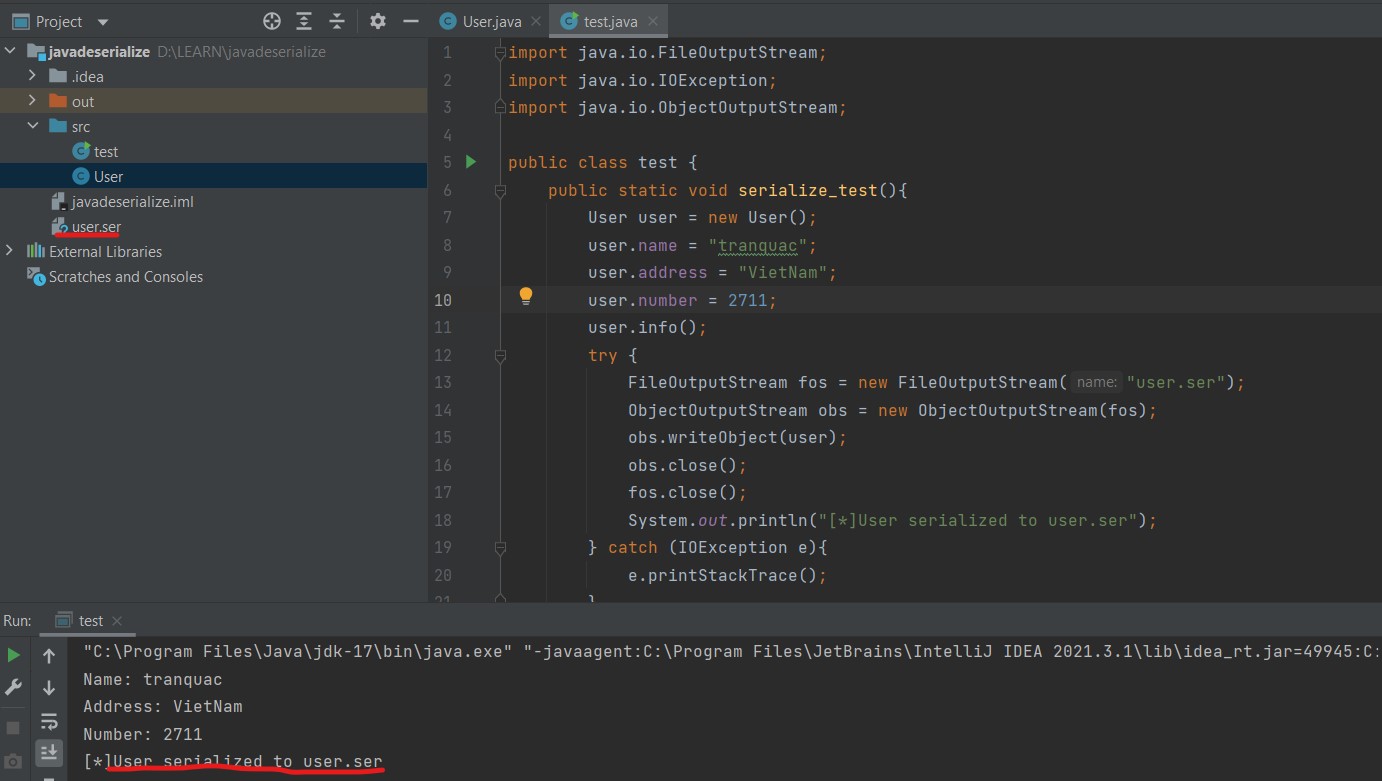
Viewing the user.ser file as Hex

Adding the deserialization function to test.class:
import java.io.*;

public class test {
    public static void serialize_test(){
        User user = new User();
        user.name = "tranquac";
        user.address = "VietNam";
        user.number = 2711;
        user.info();
        try {
            FileOutputStream fos = new FileOutputStream("user.ser");
            ObjectOutputStream obs = new ObjectOutputStream(fos);
            obs.writeObject(user);
            obs.close();
            fos.close();
            System.out.println("[*]User serialized to user.ser");
        } catch (IOException e){
            e.printStackTrace();
        }
    }

    public static void deserialize_test(){
        User user = null;
        try {
            FileInputStream fis = new FileInputStream("user.ser");
            ObjectInputStream ois = new ObjectInputStream(fis);
            user = (User)ois.readObject();
            ois.close();
            fis.close();
        } catch (IOException e){
            e.printStackTrace();
        } catch (ClassNotFoundException e){
            e.printStackTrace();
        }
        System.out.println("[*]User.ser deserialized:");
        user.info();
    }

    public static void main(String[] args) {
        //serialize_test();
        deserialize_test();
    }
}
We have a try/catch block in the readObject() method that tries to catch the ClassNotFoundException. For the JVM to deserialize an object, it must be a class whose bytecode can be found. If the JVM can’t find it during object deserialization, then a ClassNotFoundException will be thrown.
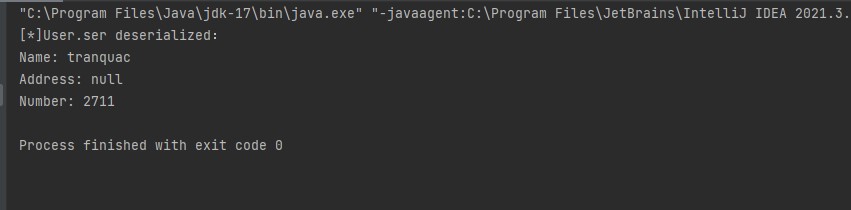
You can see that the object is deserialized; except for the Address property, the other property values are all successfully deserialized to get an object almost identical to before Serialize. The Address property here is because the transient keyword was set. The specific principle will be explained below.
serialVersionUID
serialVersionUID is the serialized version number, in line with Java’s serialization mechanism. Simply put, Java’s serialization mechanism verifies version consistency by evaluating the serialVersionUID. When deserializing, the JVM compares the serialVersionUID in the incoming byte stream with the serialVersionUID of the corresponding entity class. If they’re the same, they’re considered consistent and can be deserialized. If not, a serialized-version inconsistency appears. The inconsistency exception is InvalidCastException.
serialVersionUID is generated in two ways:
One is the default 1L, for example:
private static final long serialVersionUID = 1L;
The second is generating a 64-bit hash field based on the class name, interface names, member methods and properties, for example:
private static final long serialVersionUID = xxxxL;
Explicitly defining serialVersionUID serves two purposes:
- In some cases, different versions of a class are expected to be compatible with serialization, so it is necessary to ensure that different versions of a class have the same serialVersionUID;
- In some cases, you do not want different versions of a class to be serializable, so you need to ensure that different versions of a class have different serialVersionUIDs.
(I left this in English because I find it easier to understand)
Controlling serialization
In some cases, we may need to control the serialization process, such as which part doesn’t need to be deserialized, etc. In this case, the Serializable interface can be replaced with the Externalizable interface to control the serialization process.
Externalizable
The Externalizable interface inherits the Serializable interface and adds two methods: writeExternal() and readExternal(), which are automatically called during serialization and deserialization, to perform some special operations to achieve process control.
The transient keyword
When we serialize, there may be some special child objects that we don’t want to automatically save and restore. For example, child objects representing sensitive information. Although the information in the object is a private property, after serialization people can illegally obtain the information by reading the file or intercepting the data packet.
At this point we can use the transient keyword to prevent that property from being serialized, just like the original example.
Implementing Serializable yourself
If you’d rather not use the built-in serialize and deserialize methods, you can also implement the Serializable interface yourself and add the writeObject() and readObject() methods to your class; these methods will be called automatically after the object is serialized and deserialized. What’s worth noting is that we’re talking about “adding” and not “overriding”, meaning as long as we provide these two methods, the program will use these two methods instead of the default Serialize mechanism.
private void writeObject(ObjectOutputStream stream) throws IOException
private void readObject(ObjectInputStream stream) throws IOException, ClassNotFoundException
Note that these methods are defined as private.
When ObjectOutputStream.writeObject() is called, the Serializable object passed in is checked to see whether its own writeObject() is implemented. If it’s implemented, the normal Serialize process is skipped and its own implemented writeObject() is called. It’s the same for the readObject() method
serialized binary format
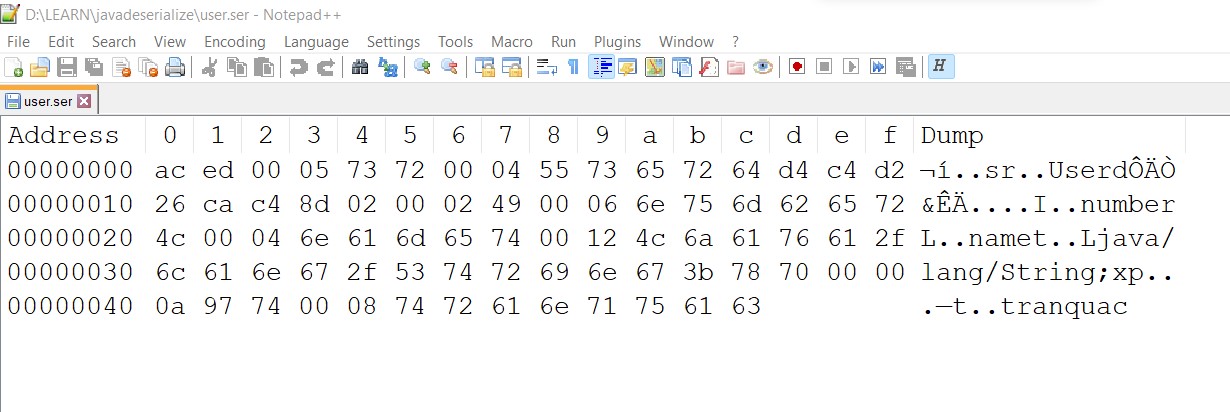
- AC ED: STREAM_MAGIC, tells the serialization protocol used, from which you can determine whether the saved content is serialized data or not.
- 00 05: STREAM_VERSION, the serialization protocol version.
- 0x73: TC_OBJECT, says that this is a new object.
- 0x72: TC_CLASSDESC, says that a new class begins here.
- 00 04: The length of the class name, where the Class name is User and the length is 4.
- 55 73 65 72: The class name User.
- 64 D4 C4 D2 26 CA C4 8D: SerialVersionUID, the serialized ID; if not specified, an 8-byte ID is randomly generated by the algorithm.
- 0x02: declares that the object supports Serialize.
- 00 02: The number of variables in this class.
- 0x49: The field type, 49 stands for "I", which is Int.
- 00 06: The length of the variable name; the field name is number and the length is 6.
- 6E 75 6D 62 65 72: Describes the variable name, this is number.
- 0x4C: The field type, 4C stands for String.
- 00 04: The length of the variable name; the variable name is name and the length is 4.
- 6E 61 6D 65: Describes the variable name, this is name.
- 0x74: TC_STRING, represents a new string, using a string to reference the object.
- 00 12: The length of the string, where the string is "Ljava / lang / String;" and the length is 0x12.
- 4C 6A 61 76 61 2F 6C 61 6E 67 2F 53 74 72 69 6E 67 3B: The JVM's standard object signature notation, here referring to the string "Ljava / lang / String;".
- 0x78: TC_ENDBLOCKDATA, the marker for the end of the object data block.
- 0x70: TC_NULL, ends the “class description”
- 0x74: TC_STRING, represents a new String, using a String to reference the object.
- 00 08: the length of the String tranquac, the length is 8.
- 74 72 61 6E 71 75 61 63: Describes the variable name, this is "tranquac".
Continuing with implementing serialization yourself
As mentioned in the Serializable implementation in the implement-serialization-yourself part above, we can add two methods, writeObject() and readObject(), that don’t belong to any class or interface, as long as these two methods are provided in the class being Serialized, it will be called automatically in the Serialize mechanism.
The advantage of a custom implementation is that the programmer can fine-tune or customize the Serialize they want to perform, such as reversing the name and address variable values in the following example. Using this feature, some sensitive information can be specially handled during the Serialize process.
User.class: the two methods writeObject() and readObject(), with the private keyword added:
import java.io.IOException;
import java.io.ObjectInputStream;
import java.io.ObjectOutputStream;
import java.io.Serializable;

public class User implements Serializable {
    public String name;
    public String address;
    public int number;

    private void writeObject(ObjectOutputStream out) throws IOException {
        System.out.println("[*]Write Object.");
        out.writeObject(new StringBuffer(name));
        out.writeObject(new StringBuffer(address));
        out.writeInt(number);
    }

    private void readObject(ObjectInputStream in) throws IOException, ClassNotFoundException {
        System.out.println("[*]Read Object.");
        this.name = ((StringBuffer)in.readObject()).reverse().toString();
        this.address = ((StringBuffer)in.readObject()).reverse().toString();
        this.number = in.readInt();
    }
}
test.class
import java.io.*;

public class test {
    public static void serialize_test(){
        User user = new User();
        user.name = "tranquac";
        user.address = "vietnam";
        user.number = 2711;
        try {
            FileOutputStream fos = new FileOutputStream("user.ser");
            ObjectOutputStream obs = new ObjectOutputStream(fos);
            obs.writeObject(user);
            obs.close();
            fos.close();
            System.out.println("[*]User serialized to user.ser");
        } catch (IOException e){
            e.printStackTrace();
        }
    }

    public static void unserialize_test(){
        User user = null;
        try {
            FileInputStream fis = new FileInputStream("user.ser");
            ObjectInputStream ois = new ObjectInputStream(fis);
            user = (User)ois.readObject();
            ois.close();
            fis.close();
        } catch (IOException e){
            e.printStackTrace();
        } catch (ClassNotFoundException e){
            e.printStackTrace();
        }
        System.out.println("Name: " + user.name + "\nAddress: " + user.address + "\nNumber: " + user.number);
    }

    public static void main(String[] args) {
        serialize_test();
        unserialize_test();
    }
}
Run it and see, indeed through the two methods writeObject() and readObject() that I wrote myself, I get the serialize and deserialize behavior I wanted:
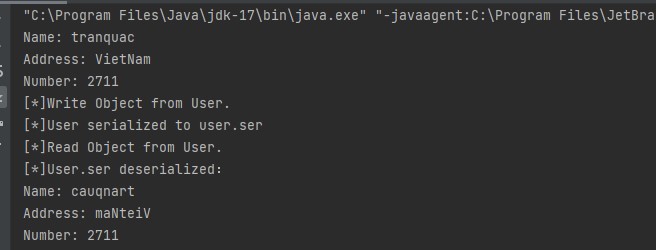
Name and Address are reversed because the deserialization was done with the readObject() I added in the User class.
What’s more?
Java deserialization vulnerabilities usually lie in the code logic of a custom-implemented readObject() method, which can trigger the deserialization vulnerability. In fact, this is similar to the principle of the deserialize vulnerability in PHP. PHP has a magic method, and if there’s faulty code, there can be a risk of a deserialization vulnerability, similar to the readObject() function implemented by customization in Java. The following example just adds Runtime.getRuntime().Execute() in the if statement from the previous example:
import java.io.IOException;
import java.io.ObjectInputStream;
import java.io.ObjectOutputStream;
import java.io.Serializable;

public class User implements Serializable {
    public String name;
    public String address;
    public int number;

    private void writeObject(ObjectOutputStream out) throws IOException {
        System.out.println("[*]Write Object.");
        out.writeObject(new StringBuffer(name).reverse());
        out.writeObject(new StringBuffer(address).reverse());
        out.writeInt(number);
    }

    private void readObject(ObjectInputStream in) throws IOException, ClassNotFoundException {
        System.out.println("[*]Read Object.");
        this.name = ((StringBuffer)in.readObject()).reverse().toString();
        this.address = ((StringBuffer)in.readObject()).reverse().toString();
        this.number = in.readInt();
   //The vulnerability is here
        if (this.number == 2711){
            Runtime.getRuntime().exec(name);
        }
    }
}
test.class
import java.io.*;

public class test {
    public static void serialize_test(){
        User user = new User();
        //change the name field to "calc" (the command that opens the calculator on windows)
        user.name = "calc.exe";
        user.address = "England";
        //satisfies the if
        user.number = 2711;
        try {
            FileOutputStream fos = new FileOutputStream("user.ser");
            ObjectOutputStream obs = new ObjectOutputStream(fos);
            obs.writeObject(user);
            obs.close();
            fos.close();
            System.out.println("[*]User serialized to user.ser");
        } catch (IOException e){
            e.printStackTrace();
        }
    }

    public static void unserialize_test(){
        User user = null;
        try {
            FileInputStream fis = new FileInputStream("user.ser");
            ObjectInputStream ois = new ObjectInputStream(fis);
            user = (User)ois.readObject();
            ois.close();
            fis.close();
        } catch (IOException e){
            e.printStackTrace();
        } catch (ClassNotFoundException e){
            e.printStackTrace();
        }
        System.out.println("Name: " + user.name + "\nAddress: " + user.address + "\nNumber: " + user.number);
    }

    public static void main(String[] args) {
        serialize_test();
        unserialize_test();
    }
}
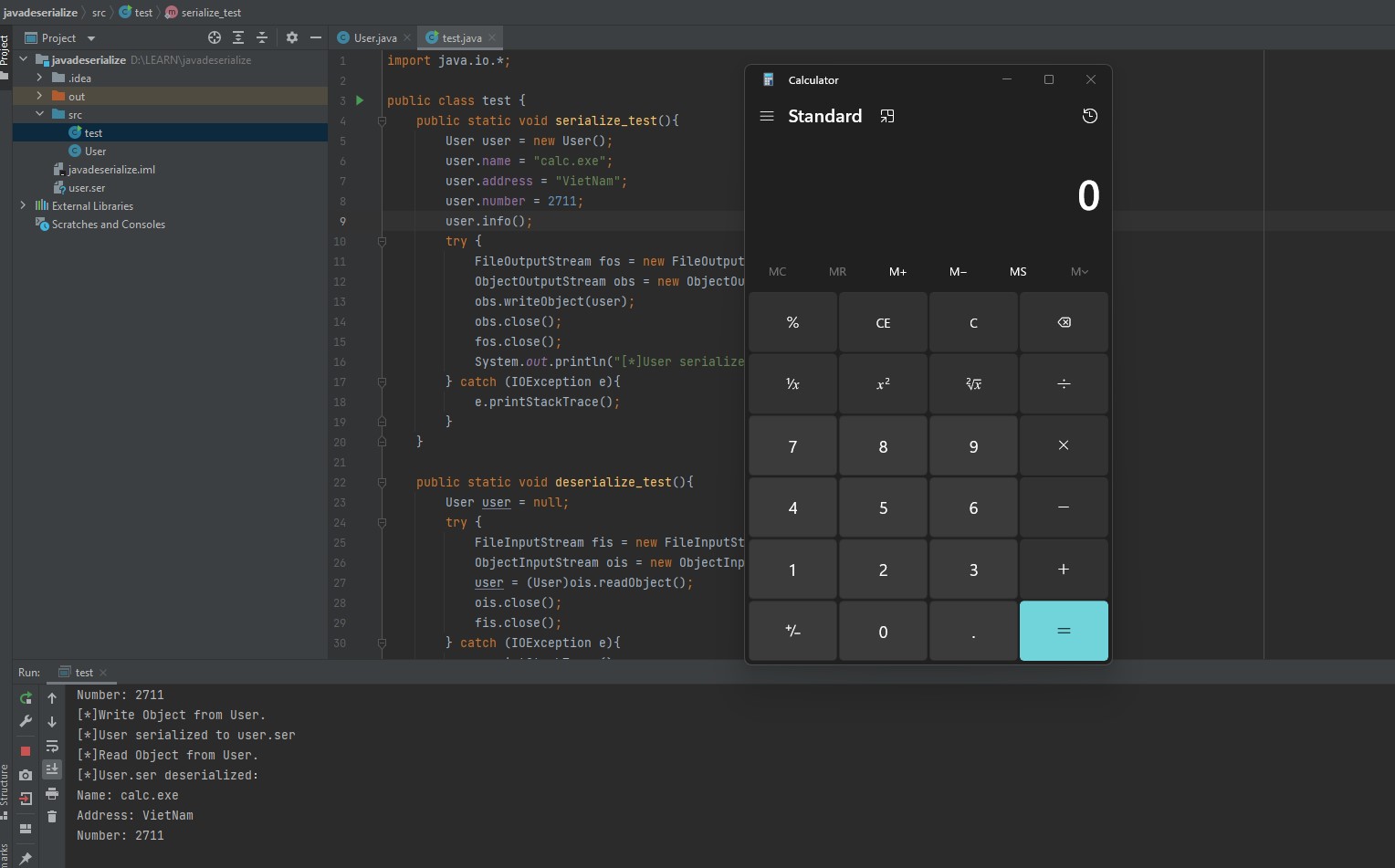
Imagine if an attacker knew the logic in the source code and could customize the input of the readObject() method. Like here, the User.ser file. Then the attacker can absolutely manipulate it and craft a malicious input to exploit the application. Thanks everyone for reading this far.